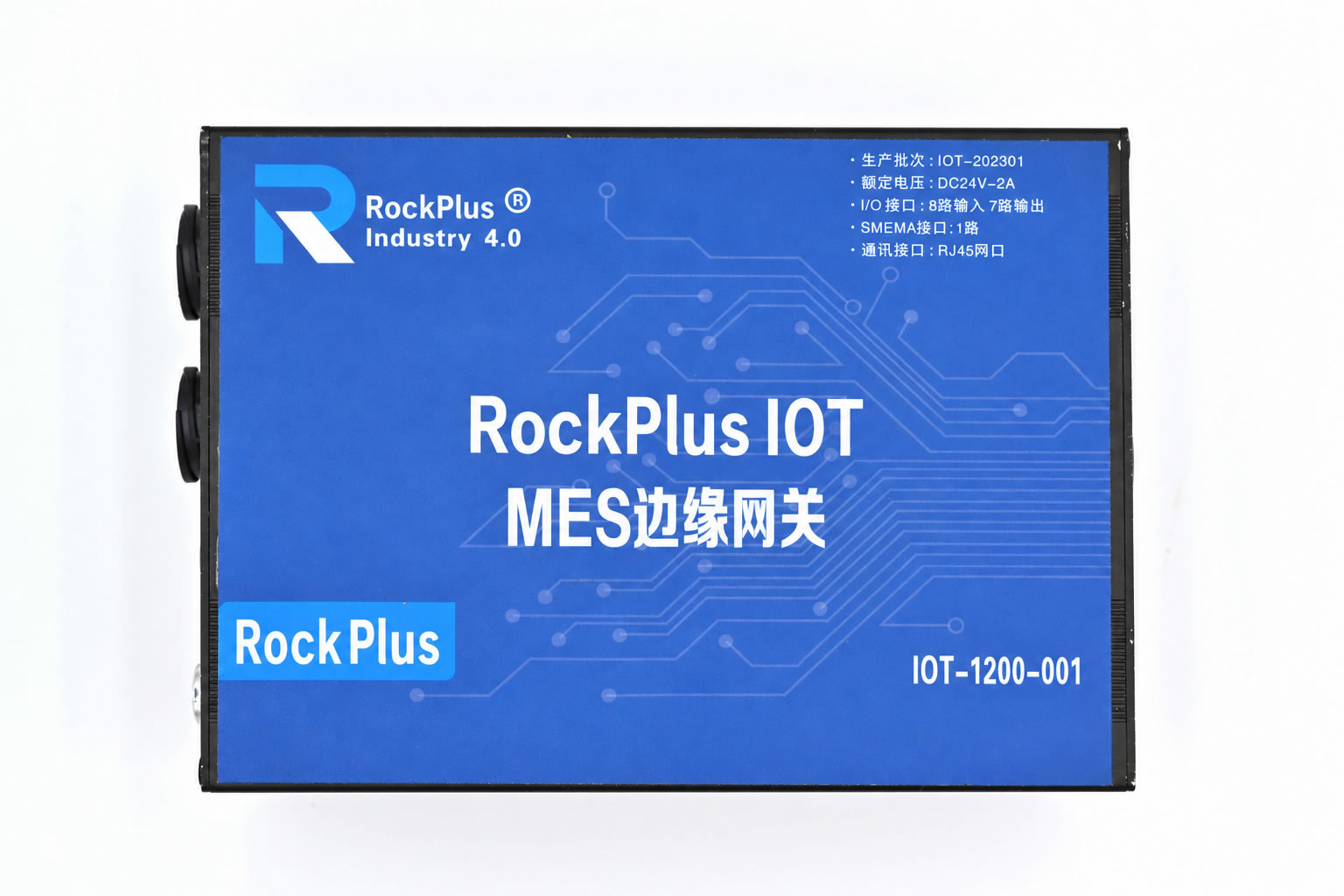
RockPlus iBox

Industrial Edge Gateway

Edge hardware for equipment connectivity, data acquisition and edge control in electronics manufacturing and industrial automation. It links MES with shop-floor equipment, bridging the information system and the equipment control layer to deliver equipment connectivity, signal acquisition, production error-proofing, equipment interlock, abnormal alarms and on-site control.

MES-Linked Error-Proofing I/O Acquisition & Control SMEMA Hermes SMEMA to Hermes Auto-Upload Status UDP Device Discovery C# SDK TCP/IP
8 Relay OutputsControl alarm lights, start/stop and interlocks
8 Digital InputsConnect sensors and in-position signals
5 Analog InputsCurrent 0-20mA, voltage 0-10V
100M Ethernet UploadCommunicates with MES and host computers
Product Introduction

Extend MES Error-Proofing to the Equipment Control Layer

Build a closed error-proofing loop of "acquire, judge, control, release, feedback", turning software error-proofing into physical error-proofing and forced interlock at the equipment.

MES Linkage and Forced Error-Proofing

When a product is NG, a process step is incomplete, material is wrong, parameters are abnormal or a station is skipped, MES can use the gateway to lock the equipment, block start-up or stop the product from passing the station. The equipment is allowed to continue only after the release conditions are met.

Field Data Acquisition and Equipment Control

Digital inputs connect photoelectric, proximity and in-position sensors; analog inputs acquire current, voltage, temperature and other parameters; multiple relay outputs can control tri-color lights, buzzers and equipment start/stop.

Rich Industrial Communication Interfaces

CAN, RS232, RS485 and 100M Ethernet are integrated to connect production equipment, instruments, sensors and inspection devices, meeting the needs of many device types on an electronics manufacturing floor.

Specifications

Product Specifications

ModelRockPlus IOT-1200 Series
Dimensions200mm × 140mm × 69mm
Key Parameters
  1. DC 24V power input
  2. STM32F407 chip
  3. Internal clock
  4. 64K EEPROM storage
Inputs / Outputs
  1. 8 relay outputs with isolated contacts, normally open or normally closed configurable by default, able to control AC/DC equipment (below 220V/10A)
  2. 8 digital inputs supporting dry contact, active PNP and NPN connections, isolation voltage 1500V
  3. 5 analog signal inputs supporting current (0-20mA) and voltage (0-10V)
  4. 2 CAN interfaces
  5. 1 SPI OLED display interface
  6. 2 RS232 interfaces
  7. 4 RS485 interfaces
  8. 1 24V power output
Host Communication100M Ethernet port
Supported Protocols
  1. SMEMA
  2. Hermes (IPC-HERMES-9852)
SMEMA Standard Support

SMEMA Interface Support

The most widely used board-handover signal interface between SMT line equipment. RockPlus iBox provides a SMEMA interface to handle board transfer handshakes with upstream and downstream machines.

What Is the SMEMA Protocol

SMEMA comes from the Surface Mount Equipment Manufacturers Association, which later merged with IPC to form the IPC SMEMA Council. The related standard is IPC-SMEMA-9851. It defines the electrical handshake between SMT equipment such as printers, pick-and-place machines, reflow ovens and AOI, and the conveyors that connect them, so a machine can tell its neighbor that a board is available or that it is ready to receive one.

  • Two basic signals: Board Available and Machine Ready, plus an optional Failed Board Available signal
  • Signals are passed as dry contacts (switch closure); the logic interface is typically 30VDC, 10mA
  • Point-to-point sequential communication with no addressing, conveying only whether a board is present and whether the machine is ready
  • No barcode or board size information is passed, which is what its successor, the Hermes standard, improves on
SMEMA Board Handover Handshake
Upstream MachineUP SMEMA
Board Available Machine Ready
Downstream MachineDOWN SMEMA
RockPlus iBox provides UP SMEMA and DOWN SMEMA interfaces. It can be wired in between upstream and downstream machines and, together with MES judgment, control the release of boards. It can also convert SMEMA signals to Hermes communication, so machines with only a SMEMA interface can join a Hermes line.
HERMES Communication Support

Hermes Communication Support

IPC-HERMES-9852 is the global standard for machine-to-machine (M2M) communication on SMT assembly lines. Based on Ethernet, TCP/IP and XML, it is the next-generation successor to SMEMA, letting machines exchange product and board information in addition to the handshake.

What Is the Hermes Protocol

The Hermes Standard (formally IPC-HERMES-9852) is an open, non-proprietary machine-to-machine communication protocol introduced by the Hermes Standard Initiative, formed by SMT equipment manufacturers, and recognized by IPC as the successor to IPC-SMEMA-9851. It uses TCP/IP and XML messages, already includes all of SMEMA's board transfer functions, and continues to evolve with one or two new versions released each year.

  • Ethernet cabling replaces the traditional SMEMA hard-wired interface, simplifying wiring
  • Each machine has an upstream and a downstream communication endpoint to talk to the machines before and after it, and it can also connect to a supervisory system
  • Beyond machine ready and board available, it can carry a unique board ID, barcode, dimensions, conveyor speed, planned route and more
  • Covers transport coordination and transport exception handling, and reduces repeated barcode reads on the line
  • Can work with IPC-CFX (IPC-2591) for vertical integration in mixed-brand SMT factories, moving toward smart manufacturing and Industry 4.0
ItemSMEMAHermes
Standard No.IPC-SMEMA-9851IPC-HERMES-9852
TransmissionDry-contact hard wiringEthernet TCP/IP
Data FormatSwitch signalsXML messages
Information PassedBoard available, machine readyAlso barcode, dimensions, speed, route, etc.
CommunicationPoint-to-point sequentialAdjacent machines and upper-level systems

Legacy Machines Can Join a Hermes Line Too

Many machines on SMT lines still have only a SMEMA interface, and replacing a whole line is costly. RockPlus iBox attaches to such a machine, captures its SMEMA board transfer signals, and communicates over the Hermes standard with upstream and downstream machines and upper-level systems. Legacy machines can join a Hermes line without modification, enabling board flow management across mixed brands and a mix of old and new equipment.

Legacy SMEMA MachineBoard Available / Machine Ready
→
RockPlus iBoxSMEMA ⇄ HERMES
→
Hermes LineTCP/IP · XML

Richer Data

XML messages carry both control messages and product data, which can be used for automatic machine setup and product traceability.

More Transparent Board Flow

Goes beyond SMEMA's two signals of "board available / machine ready" to deliver controllable, transparent board flow management.

Open, Suited to Mixed Brands

A non-proprietary open standard that suits SMT lines mixing equipment from multiple brands.

SMEMA and Hermes Coexist

Upgrading field equipment takes time, so both interfaces will coexist during the transition. iBox supports both standards and can convert between them.

Communication Features

Communication Features: More Efficient, Less Effort

Auto-Upload Status, No Periodic Polling

When a digital input changes, iBox actively reports the changed input point and its state to the host computer; data received on a serial port is also uploaded automatically. The host no longer needs to poll on a timer, which makes communication more efficient, responses more timely and the load on the network and software lighter.

  • Input changes reported instantly (point number + on/off state)
  • Data received on serial ports (RS232 / RS485) uploaded automatically
  • All input and output states can also be queried on demand

UDP Broadcast Device Discovery: Plug In and Search

Once iBox is on the network, open the companion debugging software and click "Search" to find iBox units on the LAN through UDP broadcast. It shows the IP address, MAC address, software version and release date, so you do not need to know the box's IP in advance, which makes on-site deployment and maintenance easier.

  • UDP broadcast discovery, no need to scan IPs one by one
  • Returns IP, MAC, version number and release date
  • Once found, enter the IP to connect and control
API Interface

API Interface

Two integration options: a C# SDK and TCP/IP socket hex commands. The SDK essentially sends hexadecimal commands over a socket, so any language or platform that supports TCP can talk to iBox by sending hex commands directly.

Option 1

C# SDK (RockPlus.iBoxSDK)

The SDK wraps connection, heartbeat keep-alive, automatic reconnection, I/O read/write, serial port pass-through and event callbacks. The core class is IBOXControlHelper, suited to quick integration into MES, SCADA and host software written in .NET languages.

Method / EventDescription
ConnectIBox(ip, port)Connect to iBox; default TCP port 5000
InitHebeatEvent()Start heartbeat monitoring; reconnect automatically after a disconnect
OpenDO(i) / CloseDO(i)Turn the specified relay output on / off
OpenAllDO() / CloseAllDO()Turn all outputs on / off
ReadDIStatus() / ReadDOStatus()Actively read the state of all inputs / outputs
SendCOMPortData(port, isHex, data, out msg)Send data to an RS232 / RS485 serial port, in hex or text
GetSoftwareInfo()Read the software version and release date
OnIBoxConnection / OnIBoxDisconnectedConnection and disconnection events
OnIBOXDataReceivedData received event: auto-uploaded inputs, all input / output states, serial data, version, heartbeat
// C# example
using RockPlus.iBoxSDK;
using RockPlus.iBoxSDK.Objects;

var ibox = new IBOXControlHelper();

ibox.OnIBOXDataReceived += (s, e) =>
{
    switch (e.EDataReceivedType)
    {
        case EDataReceivedType.DIAutoUploadResponse:   // input change auto-upload
            Console.WriteLine($"DI{e.AutoUploadDIIndex} = {e.AutoUploadDIStatus}");
            break;
        case EDataReceivedType.COMPortReadData:        // serial data auto-upload
            Console.WriteLine($"COM{e.ComPort}: {e.Message}");
            break;
    }
};

if (ibox.ConnectIBox("192.168.1.100", 5000))
{
    ibox.InitHebeatEvent();      // heartbeat keep-alive + auto reconnect
    ibox.OpenDO(0);              // turn on output 1 (numbering starts at 0)
    ibox.CloseDO(0);             // turn off
    ibox.ReadDIStatus();         // actively read all inputs (optional)
}
Option 2

TCP/IP Socket Hex Commands

iBox listens as a TCP server, default port 5000. In any language, just open a TCP connection and send hexadecimal bytes in the frame format; no specific development language or platform is required.

AA 55CommandMessage IDData55 AA

Frame header AA 55, frame tail 55 AA. The message ID is a 1-byte incrementing sequence number that the device returns unchanged in its response, used to match requests.

FunctionRequest (hex)
Read software versionAA 55 00 ID 00 55 AA
HeartbeatAA 55 01 ID 55 AA
Read all inputsAA 55 03 ID 55 AA
Read all outputsAA 55 05 ID 55 AA
Turn on output nAA 55 07 ID nn 01 55 AA
Turn off output nAA 55 07 ID nn 00 55 AA
Turn all outputs on / offAA 55 07 ID FF 01 55 AA / AA 55 07 ID FF 00 55 AA
Send data to serial portAA 55 09 ID port length-low length-high data... 55 AA
Response / Auto-UploadFrame Format
Version responseAA 55 00 ID major minor revision year(2 bytes) month day hour minute ...
Heartbeat responseAA 55 02 ID ...
All input statesAA 55 04 ID 8 status bytes ... (01 = on, other = off)
All output statesAA 55 06 ID 8 status bytes ...
Output execution response / serial send responseAA 55 08 ... / AA 55 10 ...
Input change auto-uploadAA 55 A0 point state 55 AA
Serial data auto-uploadAA 55 A1 port data... 55 AA
// Example: turn on output 1 (index 0), message ID = 01
AA 55 07 01 00 01 55 AA

// Example: send hex data 01 03 (length 2) to serial port 1
AA 55 09 02 01 02 00 01 03 55 AA

// Auto-upload received: input point 2 turned on
AA 55 A0 02 01 55 AA

Communicate with the device at least once every 60 seconds (for example, by sending a heartbeat). The SDK uses a 60-second heartbeat period by default; if no data is received for more than 60 seconds, it treats the link as disconnected and reconnects.

Make Every MES Decision Take Effect on the Equipment

To learn about RockPlus iBox selection, interfaces and integration options, contact us.

Phone

400 008 0655

Live Chat

Downloads

WeChat

Copyright © 2019-2026 Shanghai Hegong Software Co., Ltd. Shanghai Public Security No. 31011502014114 Shanghai ICP No. 19036824-1

  • Live Chat
  • Call
  • Back to Top